Apps
Digital Tools for Caregivers: Simple Ways to Manage a Loved One's Health and Paperwork
Simple digital tools to help family caregivers manage a loved one's medications, appointments, medical bills and paperwork.
A missed dose. A refill that ran out. A hospital bill that doesn't look right. If you're the one keeping track of all of it for a parent, a few simple tools can take some of the remembering off your shoulders.
Some afternoons you're the one who tracks the pills, books the visits and pays the bills. We understand how much you're carrying, and how easy it is to feel like something is slipping through the cracks.
Here are five practical tools, what each one helps with and how to start. Older adults can use them too.
The quick list
- A medication and appointment tracker: answers "Was the dose taken?" and "When does this run out?"
- A medical bill checker: compares a bill with the insurance EOB before you pay
- A shared calendar: everyone sees appointments, refills and who's driving
- A document folder: insurance cards and legal papers ready in a hurry
- A notes and contacts list: every phone number and doctor's comment in one place
Check a medical bill against the EOB before you pay: get OweCheck ($24.99, one-time) →
What makes a tool caregiver-friendly?
Before you choose anything, know what to look for. Good caregiving tools are:
- Easy to read: large text, clear buttons, simple screens
- Quick to learn: useful in the first five minutes, no manual needed
- Private: clear about where your loved one's information is kept
- Affordable: ideally without another monthly subscription
- Printable: able to make a page you can hand to a doctor, a sibling or a respite caregiver
Keep this checklist handy as you read on.
1. A medication and appointment tracker
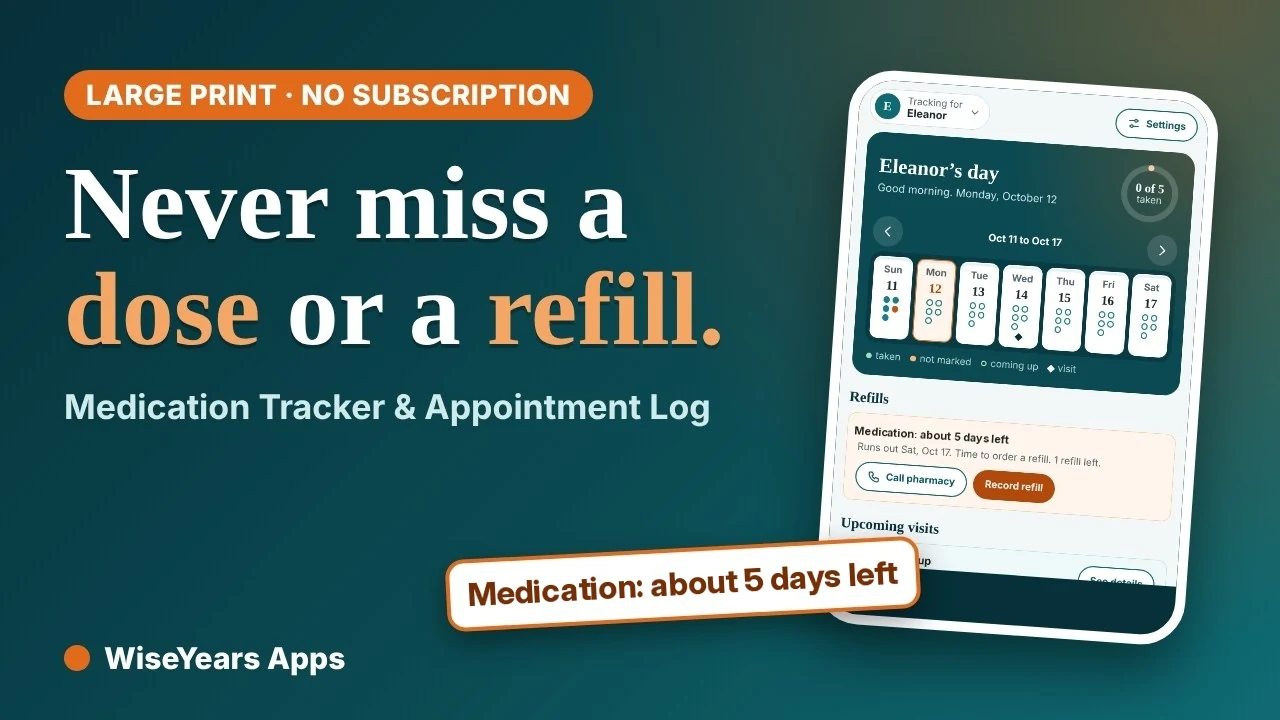
Medications are usually the first thing caregivers want to organize. A good tracker answers the everyday questions: Was the morning dose taken? When does this prescription run out? What did the doctor say last time?
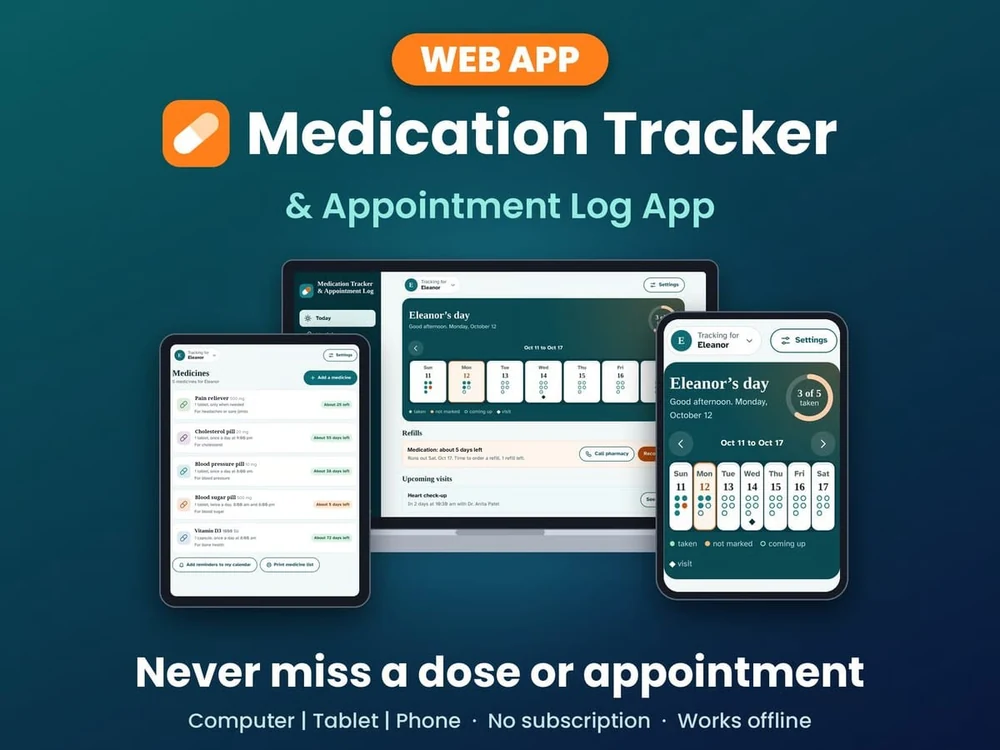
Our app: Medication Tracker & Appointment Log
We made this web app to keep medications, refills and doctor visits together in one easy-to-read place. It includes:
- Easy to read, with a text-size setting
- Simple TAKEN, UNDO and ALL TAKEN buttons
- Refill run-out warnings and an as-needed dose log
- Appointments with a printable one-page visit sheet, plus a printable med list
- Notes with tags, contacts with tap-to-call, and calendar-file reminders
- Room for more than one person, plus CSV export and backups
- No account, no subscription and no ads. Your information stays in the browser on your device, and it works offline after the first visit.
It's a one-time $24.99 purchase. It's an organizer, not a medical tool, so it doesn't check drug interactions. Your pharmacist is the best person to ask about that.
Get the Medication Tracker & Appointment Log and keep every dose in one place ($24.99, one-time) →
2. A medical bill checker
After a hospital stay or a string of specialist visits, the bills can be confusing, and mistakes happen. The surest way to check a bill is to compare it with the insurance Explanation of Benefits (EOB), which shows what the plan paid and what the patient may owe.
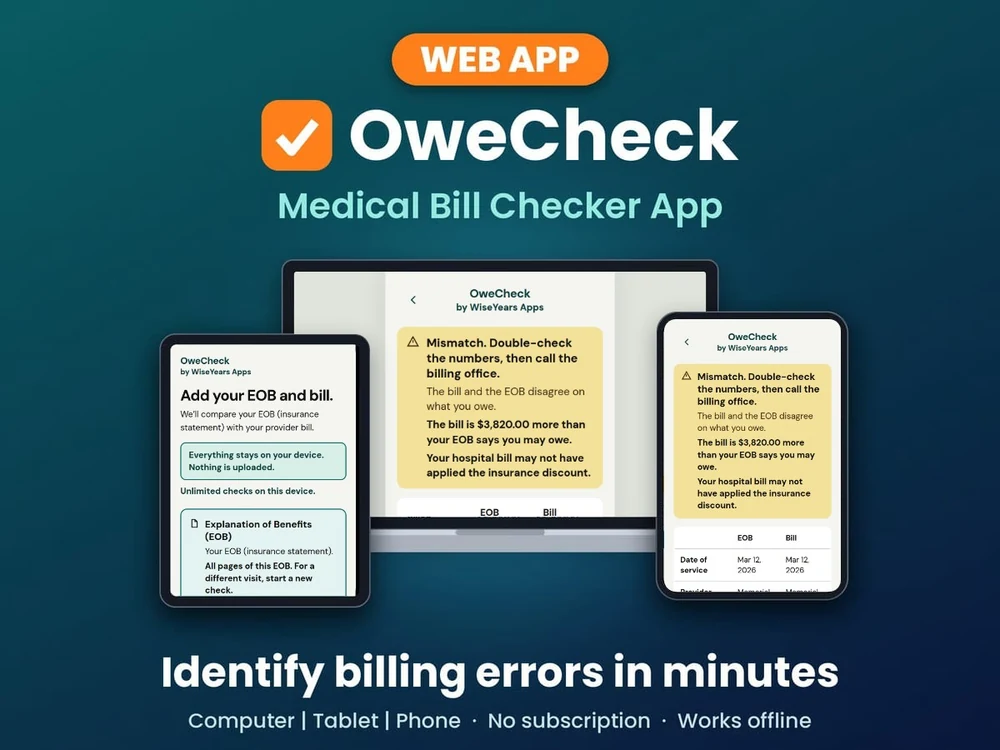
Our app: OweCheck
Snap a photo or upload a PDF of the bill and the EOB. OweCheck tells you in plain words whether the numbers match. Say the bill asks for $4,200 but the EOB says $380 is owed. OweCheck shows what doesn't match and gives you a call script. Double-check the numbers on both papers first, then call the billing office before you pay.
- Big text and big buttons for older eyes and busy caregivers
- Nothing is uploaded. Your results stay in the browser on your device, and no account is needed.
- No account, no subscription and no ads. A one-time $24.99 purchase.
OweCheck helps you spot questions worth asking. It doesn't give insurance, legal or financial advice. For a full walkthrough, see our guide on how to check a medical bill against your EOB.
Get OweCheck and check your next bill before you pay ($24.99, one-time) →
3. A shared calendar
If more than one family member helps, a shared calendar keeps everyone on the same page. Most phones and computers already have one. To set it up:
- Create one calendar just for care (for example, "Mom's care") and share it with siblings and helpers
- Put the address and who's driving in each appointment
- Add refill dates as their own events
Medication Tracker's calendar-file reminders go straight into the calendar you already use.
4. A safe home for important documents
Insurance cards, a list of diagnoses, power of attorney papers and advance directives are often needed in a hurry. Consider:
- Scanning or photographing key documents with your phone
- Saving them in a password-protected folder
- Keeping the paper originals together in one labeled folder at home
- Telling a trusted family member where both are
5. A simple notes and contacts system
Write down the doctors' names, the pharmacy's number, the home health nurse and the neighbor with the spare key once. Keep the list where you can reach it fast.
Notes matter just as much. A quick line after each visit or call ("Cardiologist wants a follow-up in three months") saves guesswork later. Medication Tracker includes tagged notes and contacts with tap-to-call, so they live next to the medication list.
Two simple tools, one calmer week
If you're just getting started, these two web apps cover the biggest headaches for many caregivers:
- Medication Tracker & Appointment Log for daily doses, refills and doctor visits
- OweCheck for comparing medical bills with the insurance EOB
Both are easy to read, with no account, no subscription and no ads. Nothing you enter is uploaded. Both open in any web browser on any device. Each is a one-time $24.99 purchase.
Why pay when free apps exist? Free apps often come with ads, an account to create or a monthly upgrade. These cost $24.99 once and keep your loved one's information on your own device.
A simple weekly routine
Tools work best with a little rhythm. Set aside 15 minutes once a week to:
- Check upcoming appointments and confirm rides
- Look at refill warnings and call in prescriptions
- Open new medical mail and compare any bills with their EOBs
- Update notes and share changes with family
Helping an older adult feel at home with new tools
If your loved one will use these tools too, go gently:
- Set the text size large before you hand over the phone or tablet
- Show one feature at a time, starting with the one they'll use most
- Write short printed steps they can keep beside the device
- Celebrate small wins, and be patient while they learn
You're doing more than you know
There's no perfect system, and some weeks the paperwork wins. That's okay. Every list you make and every question you ask is a quiet act of love for the person in your care. Start with one tool and one small habit, and give yourself the grace you give others.
Check your next medical bill before you pay: get OweCheck ($24.99, one-time) →
▶ Watch the Medication Tracker demo ▶ Watch the OweCheck demo
This article is general information only and isn't medical, legal or insurance advice.